
Guide
How to Fix a Blurry Picture on iPhone
Last updated: September 17, 2026
Most blurry pictures on an iPhone are not the camera's fault — they are the storage settings, the apps, or the zoom. Here is how to tell what went wrong, and the fixes that work, straight from the phone in your hand.
First decide: pixelated or soft?
The fix depends on which kind of blurry you are looking at:
- Pixelated — visible square blocks or a mosaic pattern. The image is small or was compressed hard, and the blocks are what remains. This is the case AI reconstruction is built for.
- Soft or smeared — no block structure, just no snap. That is usually missed focus, motion, or a heavy digital zoom. Free edits can help a little; AI helps less here, because there is less structure to estimate from.
Fix 1: the free Photos app edits
Open the picture in Photos, tap Edit, and try — in this order — Sharpen, Definition, Brilliance and a small Contrast lift. These raise local contrast and can rescue a mildly soft photo in under a minute, at no cost.
The limit is contrast itself: sharpening cannot rebuild information that was never captured. If blocks are visible, the free edits will only make them crisper blocks — that is when the AI route below earns its keep.
Why iPhone pictures turn blurry in the first place
- Optimised storage. With Optimise iPhone Storage enabled, the phone keeps small versions on-device and the full-resolution originals in iCloud. A photo opened before the full version downloads can look surprisingly poor — and if you share or edit that small version, you are working with it, not the original.
- Digital zoom. Beyond the optical range, zoom is just stretching pixels. The telephoto lenses on Pro models exist precisely because software cannot invent what the sensor did not catch.
- Saved-from-app images. Pictures saved out of chats and social apps are already compressed copies — saving them again adds another layer.
- Screenshots. A screenshot captures the screen, not the scene — a resolution-limited copy of whatever was on display. See our screenshot guide.
Fix 2: get the full-quality original back
Before repairing anything, check whether a better version already exists:
- In Settings > Photos, look at the storage setting. With Download and Keep Originals selected, the device keeps full-resolution files locally. On optimised storage, open the photo, let it finish downloading at full quality, then edit or share that version.
- If the picture came from someone else, ask them for the original file — sent by document attachment, email or a cloud link rather than a standard chat upload. The version you received was re-encoded in transit; the original on their phone was not.
An original retrieved this way beats any repair. Our guide to pictures going blurry in transit covers the sending side in detail.
Fix 3: AI reconstruction, right in Safari
When the best available source is genuinely blocky, repair it without leaving the phone — the tool runs in the browser, no app required:
- Open the tool and sign in with Google. 2 free credits on sign-up, no credit card required.
- Upload from your library. JPG, PNG or WEBP, up to 10 MB. Crop first if only part of the photo matters.
- Pick a mode. Quick returns 4MP for 1 credit; Standard returns 8MP for 2 credits; HD adds stronger detail reconstruction at the same 2 credits, from the Pro plan.
- Compare and download. Most jobs finish in under a minute; failed jobs do not use credits. Keep the downloaded PNG rather than re-saving it through an app that compresses.
 BeforeAfter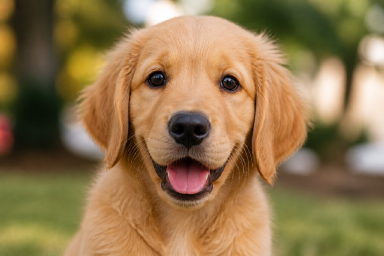
Drag the divider: the blocky half is the tiny source the model receives, the sharp half is its reconstruction of fur, eyes and background.
Fix 4: desktop software, for the serious cases
For photos destined for printing, or a whole library of low-resolution scans, desktop AI applications (Topaz Gigapixel AI and similar) process in batches with more output control. The same caveat holds — detail is estimated — so test on your worst image before committing a batch.
On Android?
The causes and cures are nearly identical. Google Photos has the same Sharpen and Define edits; storage-saver upload modes create the same small-version problem; chat apps compress the same way. The AI route works in Chrome on Android exactly as in Safari.
Stop it happening again
- Keep originals. Let iCloud keep full-resolution copies, or back up the library elsewhere before enabling any optimised-storage mode.
- Send pictures as files — document attachment, email or cloud link — so no app re-encodes them in transit.
- Stay within optical zoom and crop afterwards instead.
- Save media once, from the best source. The first copy you save is usually the best one you will ever have.
Frequently asked questions
Why do my iPhone photos look blurry after sending them?
Because the receiving app compresses them. iMessage has an optional Low Quality Mode, photos sent as SMS/MMS are downscaled hard for carrier networks, and chat apps re-encode media on send. Our guide to pictures going blurry in transit covers the settings that fix this.
Does the tool work in Safari on iPhone?
Yes. The tool runs entirely in the browser: sign in with Google, upload from your photo library or files, and download the result. There is no app to install, and it works the same in Chrome on Android.
Can it fix a photo that is simply out of focus?
Results on soft, out-of-focus photos are more limited. AI reconstruction is built for pixelation — visible blocks from upscaling, heavy compression or small sources — where structure survives for the model to estimate from.
Why does a photo look sharp on my iPhone but blurry to the person I send it to?
Your phone may be showing a locally cached full-resolution copy while the sent copy is a compressed re-encode. The version that arrives is the version the app chose to transmit, not the version you see.
How much does it cost on mobile?
Exactly the same as desktop: new accounts get 2 free credits valid for 7 days, no credit card required. Quick returns 4MP for 1 credit; Standard and HD return 8MP for 2 credits.
More guides
- The full background on causes, methods and prevention: how to unpixelate an image.
- Text in the photo matters? How to unblur text in an image.
- Photos that blur after sending? Why pictures get blurry when sent.
Try it free — 2 credits on sign-up, no credit card required
fix a blurry picture free